Why “Just Enough Access” Is the Small Business Security Rule Most Owners Skip
A part-time bookkeeper at a 12-person marketing firm needed access to the accounting software. Instead, she got a login that also opened the shared drive, the client database, and the admin panel for the company website. Nobody set out to hand her the keys to everything. It just happened, because someone copied her account settings from a full-time employee to save time.
Six months later, her personal email was compromised in an unrelated breach, and the same password showed up in a credential-stuffing attempt against the firm’s systems. The attacker didn’t need to break into the accounting software directly. They just needed one overprivileged account.
This is the problem least-privilege access is built to solve, and it’s one small businesses run into more often than most owners realize.
What Least-Privilege Access Actually Means
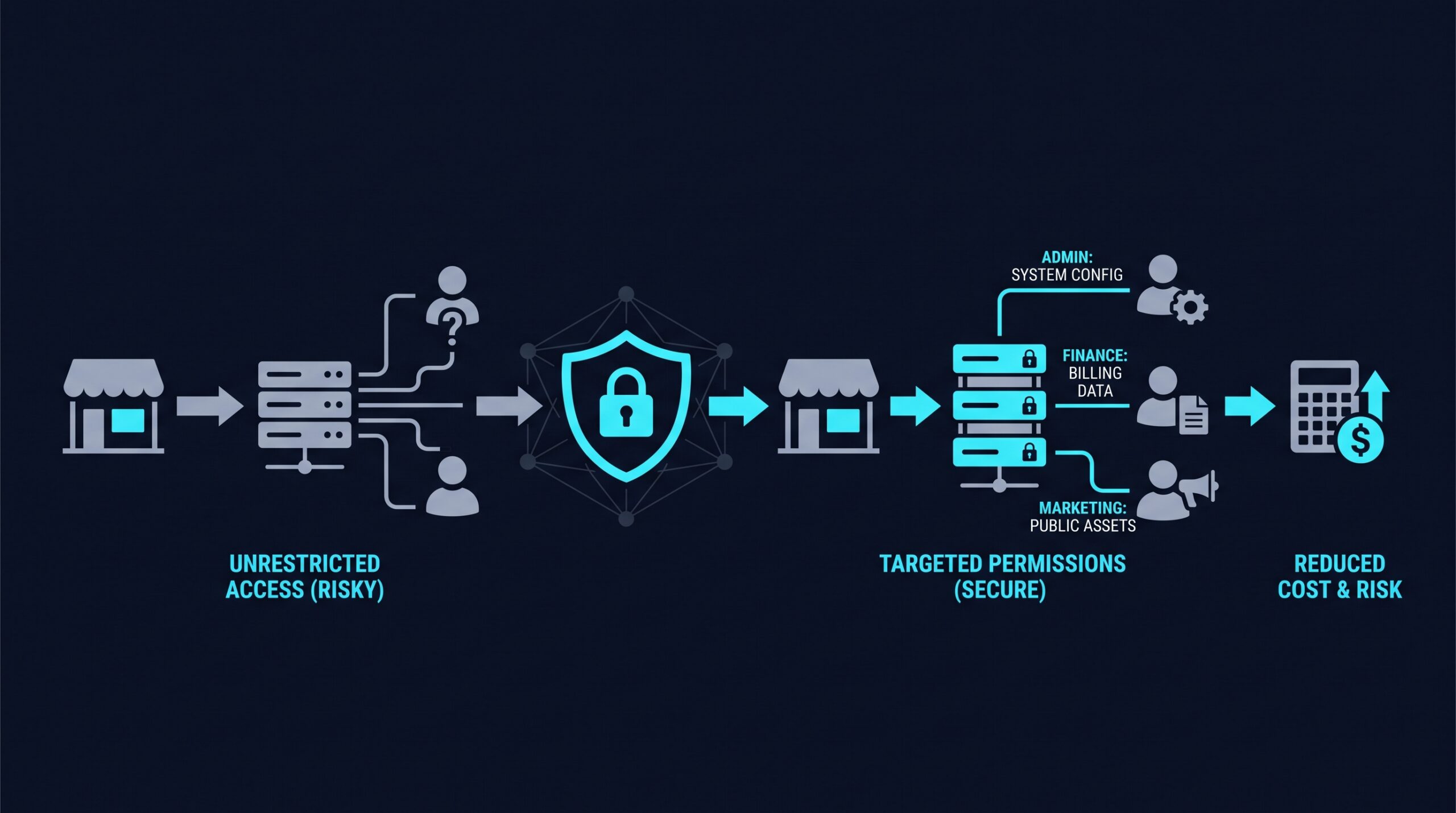
Least-privilege access is a simple idea: every person, device, and application should get the minimum level of access needed to do its job, and nothing more. A sales rep doesn’t need access to payroll files. A marketing intern doesn’t need admin rights on the server. A point-of-sale system doesn’t need a connection to the HR database.
It sounds obvious once it’s written out. But most small businesses don’t build their systems this way from the start. Access accumulates over time as people change roles, contractors come and go, and new tools get plugged into the network without anyone revisiting who can see what.
The result is what security teams call “privilege creep.” Nobody made one bad decision. A hundred small, reasonable-seeming decisions just added up.
Why This Isn’t Just an Enterprise Problem
It’s tempting to think of least-privilege access as something for banks or hospitals with dedicated IT security staff. Small businesses tend to run leaner, with shared logins, informal onboarding, and one person wearing the “IT” hat alongside three other jobs.
That informality makes the problem worse, not less relevant. Fewer safeguards mean a single compromised account can reach further into the business, faster, because access was never segmented in the first place. A larger company might have twenty layers between a marketing account and financial systems. A small business often has one flat network where everything talks to everything.
The Insider Threat Piece Nobody Wants to Think About
Most small business owners picture their security threat as an outside hacker breaking in. That’s a real risk, but the bigger exposure often comes from inside the business itself. Verizon’s 2024 Data Breach Investigations Report identifies insider misuse and human error as recurring factors in confirmed breaches, alongside external attacks. That year’s report also changed its methodology, separating malicious insider action from simple negligence in the analysis. The split makes clear that most internal risk is unintentional rather than someone plotting against the business.
That doesn’t mean employees are careless by nature. More often it’s a mistake: someone clicks a phishing link while logged into an account with far more reach than their role requires, or a departing employee’s access isn’t revoked quickly enough. Least-privilege access doesn’t stop the mistake from happening. It limits how far the mistake can travel.
What Broad Access Actually Costs
The financial angle is where this stops being theoretical. Apono’s November 2024 research on insider threats put average incident costs at around $8 million, driven by recovery, downtime, and reputational damage. Most of the organizations in that data set were larger than a typical small business, but the same cost drivers scale down: recovery, client trust, and regulatory exposure, if customer data is involved, tend to compound quickly for any business without deep reserves. For a five-person company, even a fraction of that number is enough to close the doors.
The Cloud Security Alliance’s Top Threats to Cloud Computing 2024 report ranked identity and access management failures, including compromised and overprivileged credentials, as the second most significant cloud security threat organizations face, behind misconfiguration and just ahead of insecure APIs. The pattern shows up repeatedly in how attackers move once they’re inside a network. The initial break-in is often less damaging than what the attacker can reach afterward.
Why So Few Businesses Have Actually Fixed This
If least-privilege access is such an obvious idea, why isn’t it standard practice everywhere? Delinea’s 2025 Ransomware Report found that only about 34% of organizations have fully implemented least-privilege access controls, even though most rank it as a security priority.
That shortfall between stated priority and actual practice tracks with what shows up on the ground. Saying “we should limit access” is easy. Auditing who has access to what, rebuilding permission structures, and maintaining that discipline as the team grows takes ongoing effort. Most small businesses don’t have a security team dedicated to that upkeep, so it slides.
How Least Privilege Actually Works Day to Day
In practice, least-privilege access isn’t one setting you switch on. It’s a combination of a few connected ideas.
Role-based access control (RBAC) ties permissions to job function rather than to individual people. When someone moves into a new role, their access changes with it, instead of piling on top of what they already had.
Just-in-time (JIT) access grants elevated permissions only for the specific window they’re needed, then revokes them automatically. A contractor who needs server access for a two-week project gets it for two weeks, not indefinitely.
Network segmentation keeps systems separated so that a compromise in one area, like a guest Wi-Fi network or a marketing tool, can’t reach financial or customer data by default.
This is also where Zero Trust Network Access architecture comes in. Rather than assuming anyone inside the company network is automatically trustworthy, a Zero Trust Network Access approach verifies identity and device health for every connection, then grants access only to the specific application or resource needed, not the whole network. Least-privilege access is the policy; Zero Trust Network Access is one of the more practical ways to enforce it technically.
Common Mistakes Small Businesses Make
A few patterns show up repeatedly.
Cloning access from an existing employee is the fastest onboarding shortcut and one of the most reliable ways to create privilege creep, since it copies whatever excess access that person accumulated too. Shared logins for tools like social media accounts or file storage make it nearly impossible to trace who did what, and they rarely get updated when someone leaves. Offboarding often lags: an employee’s badge gets deactivated on their last day, but their software logins linger for weeks because nobody owns that checklist.
None of these are dramatic failures. They’re small gaps that don’t matter until they suddenly do.
Getting Started Without Overhauling Everything
The good news is that least-privilege access doesn’t require ripping out existing systems. Most businesses can start with an access audit: a straightforward list of who has access to what, and whether that access still matches their current role. It’s tedious, but it’s usually the step that reveals the most.
From there, tools built around Zero Trust Network Access principles can help enforce the policy going forward rather than relying on someone remembering to update permissions manually. NordLayer, for example, is one option small businesses use to set up role-based access rules and segment network resources without needing a dedicated security team to manage it. If you sign up through some of the links in this article, EdgeTrustNetwork may earn a commission at no extra cost to you.
Whatever tool or process a business chooses, the underlying habit matters more than the software: review access on a schedule, not just when something goes wrong.
Back to the Bookkeeper
If that marketing firm had built its systems around least-privilege access from the start, the bookkeeper’s account would have opened the accounting software and nothing else. Her compromised password would have still been a problem, but a contained one, not a doorway into the client database and the company website.
That’s the whole point of least-privilege access. It doesn’t promise a business will avoid every mistake or every stolen password. It just makes sure one mistake doesn’t get to become the whole story.