Zero Trust for Law Firms: When “Reasonable Security” Becomes a Malpractice Question
A paralegal at a mid-size litigation firm finishes a deposition summary at 9 p.m., saves it to a shared drive, and closes her laptop at a coffee shop near her apartment. Nothing unusual happens that night. But the login credentials she used to reach that shared drive were phished three weeks earlier and sold on a forum neither she nor her firm’s IT contractor ever monitors. By the time anyone notices, a competitor’s counsel already has a copy of the client’s settlement strategy.
That scenario is not exotic. It is the ordinary failure mode of network security built around usernames, passwords, and a firewall at the office. For law firms, the stakes of that failure are different from most industries, because the thing being exposed is not just company data. It is privileged, confidential client information that the firm has an ethical and often contractual duty to protect.
Why Law Firms Sit in the Crosshairs
Law firms hold a concentrated mix of exactly what attackers want: merger details before they’re public, litigation strategy, trade secrets, personal financial records, and sometimes government or healthcare data by extension of their clients’ business. A single breach can touch dozens of client matters at once.
Ransomware trackers offer one clear signal here. Halcyon and Mandiant, two firms that publish ongoing threat intelligence on ransomware activity, both list legal services among the industries that show up repeatedly as targets, and the FBI has issued warnings directly to the legal sector about campaigns aimed at client files. None of this is speculative. It reflects a pattern these organizations keep watching, not a single closed case tied to one dated report.
Firms also tend to run leaner IT operations than the industries whose data they handle. A 200-attorney firm may have a smaller security team than the healthcare client whose records it’s litigating over, which creates a gap between the sensitivity of the data and the resources defending it.
The Ethical Layer That Makes This Different From Ordinary IT Risk
For most businesses, a data breach is primarily a financial and reputational problem. For a law firm, it can also be a professional responsibility problem.
The American Bar Association’s Model Rule 1.6 requires attorneys to make “reasonable efforts” to prevent unauthorized disclosure of client information, and Comment 8 to Model Rule 1.1 has established that competent representation includes staying current on the risks and benefits of relevant technology. State bars have increasingly interpreted these rules to mean that ignoring known, practical security measures is not a neutral choice. It can be treated as a competence failure.
That framing matters because it changes what “good enough” security looks like over time. A control that was considered reasonable five years ago, like a firewall and a shared VPN, is judged against the tools available today, not against the tools available when the firm first set up its network. As Zero Trust approaches become standard practice across regulated industries, firms that stick with older perimeter models may find it harder to argue they met their duty of reasonable care if something goes wrong.
Why the Old Office Perimeter Doesn’t Match How Firms Actually Work
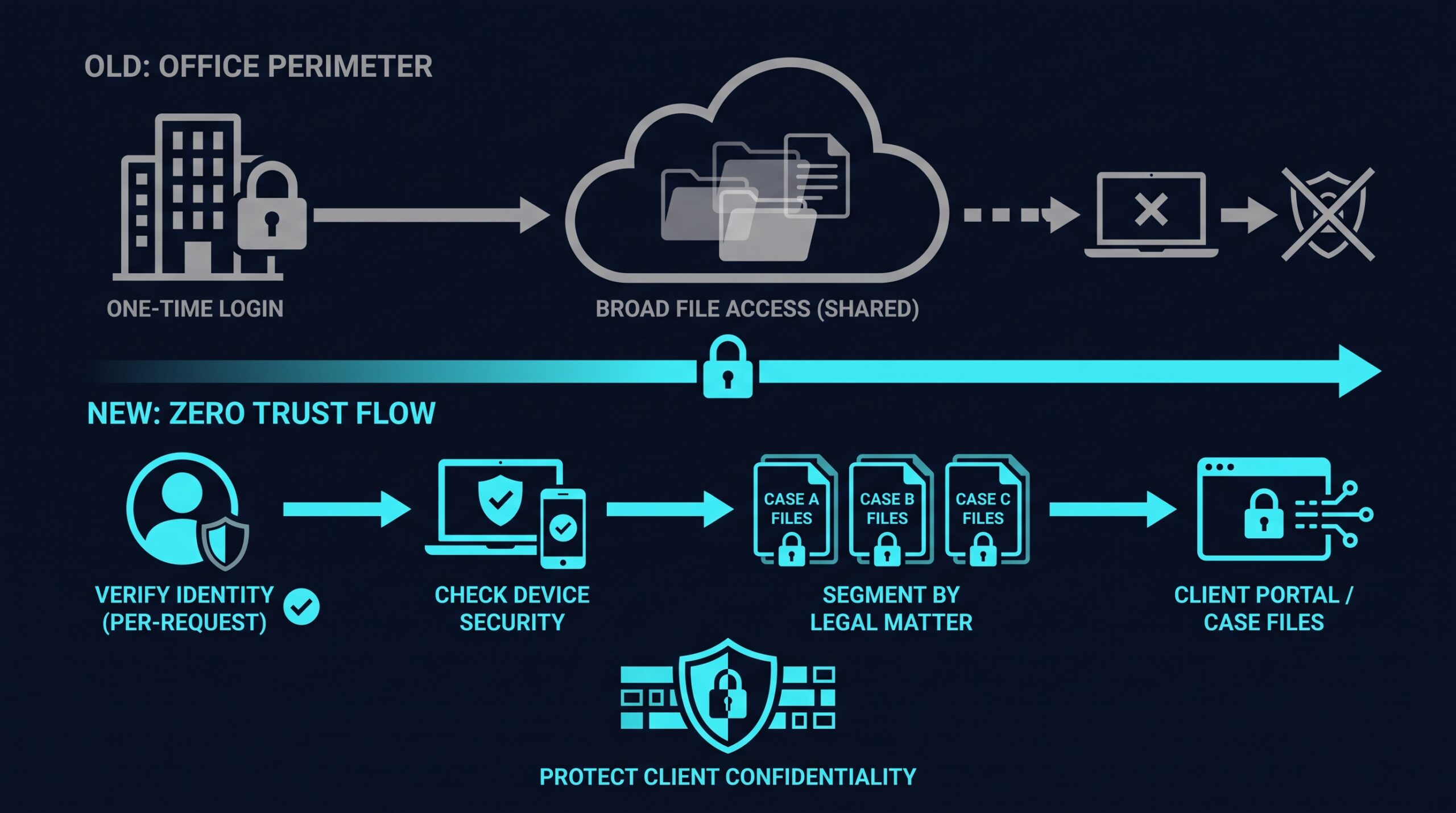
Traditional network security assumes a firm operates inside a defined perimeter: an office, a corporate network, a VPN tunnel that treats anyone who logs in as trustworthy from that point forward. That assumption has been quietly false for years at most firms, and the shift to hybrid work only widened the gap.
Attorneys review documents from home networks, airport lounges, and client sites. Paralegals and associates use personal devices for quick email checks. Outside co-counsel, expert witnesses, and e-discovery vendors need access to specific case files without needing access to everything else on the firm’s network. A VPN that grants broad network access once someone authenticates doesn’t account for any of this, and it means one compromised credential can expose far more than the single matter that credential was meant to touch.
How Zero Trust Network Access Actually Works
Zero Trust Network Access starts from a different assumption: no user, device, or connection is trusted by default, even if it’s already inside the network. Access is granted per-application and per-session, based on who someone is, what device they’re using, and whether that specific request makes sense.
Verifying Identity Before Granting Anything
Instead of one login unlocking the network, each request for a specific application or file is checked against identity and context. This usually means combining multi-factor authentication with continuous verification, so a session doesn’t stay open indefinitely just because it started legitimately.
Segmenting Access by Matter, Not Just by Department
Rather than one flat network where anyone inside can potentially reach anything, Zero Trust architectures use micro-segmentation to wall off individual applications, file shares, or case databases. In practical terms, an associate working on a corporate transaction shouldn’t have a path into a family law matter’s files just because they’re both stored on the same server. This limits how far a single compromised account can travel, which matters enormously when the account belongs to someone with access to multiple clients’ confidential information.
Checking the Device, Not Just the Person
Zero Trust systems typically also evaluate the device making the request: is it running an outdated operating system, does it have endpoint protection active, is it a managed firm laptop or a personal phone. A firm can set policies so that sensitive client portals are only reachable from devices that meet certain security standards, regardless of whether the right password was entered.
Applying This to How Firms Actually Operate
Remote and Hybrid Attorneys
An attorney working from home doesn’t need a full tunnel into the firm’s network. Zero Trust lets IT grant access to the specific case management system, document repository, and email needed for that day, with the connection re-verified rather than left open on trust. Products like NordLayer market this kind of per-application access control specifically for smaller professional services firms that don’t have a dedicated security engineering team, though firms should evaluate any vendor’s actual feature set against their specific matter management and file-sharing tools rather than relying on marketing copy alone. If you sign up through some of the links in this article, EdgeTrustNetwork may earn a commission at no extra cost to you.
Co-Counsel, Experts, and Outside Vendors
Litigation regularly involves people outside the firm who need temporary, narrow access: an expert witness reviewing exhibits, co-counsel on a joint defense matter, an e-discovery vendor processing a document set. Zero Trust architectures make it practical to grant that access scoped to a single matter and a defined time window, then revoke it cleanly when the engagement ends, instead of leaving a guest account active on the general network indefinitely.
Client Portals and Document Sharing
Clients increasingly expect a secure portal rather than email attachments for sensitive documents, and some corporate clients now include cybersecurity requirements in their outside counsel guidelines. A Zero Trust approach to the systems behind that portal, verifying both the client’s identity and the device they’re using, gives the firm a defensible answer when a client’s own security team asks how their data is protected.
Matching the Approach to Firm Size
A 500-attorney firm with an internal security team and a solo practitioner sharing a paralegal are not solving the same problem, even though both hold privileged client data. Larger firms may build Zero Trust architecture around enterprise identity providers and custom policy engines. Smaller and mid-size firms are more often better served by managed platforms designed to be deployed without a dedicated security staff, where the vendor handles much of the underlying policy engine and the firm configures access rules through a simpler interface.
The right fit depends on the firm’s existing tools, the number of matters running concurrently, and how much outside access (co-counsel, experts, vendors) the firm regularly grants. A firm evaluating options should look closely at how each platform handles per-application access, device checks, and audit logging, since audit trails matter both for security investigations and for demonstrating due diligence if a bar complaint or malpractice claim ever raises the question.
The Malpractice and Insurance Conversation Nobody Wants to Have
Cyber insurance underwriting has also grown more specific. Whether a firm has multi-factor authentication, network segmentation, and matter-level access controls in place is a more useful question for an insurer than whether the firm has a firewall, and a firm that can only speak in general terms about its controls may find that reflected in its premium or in what the policy excludes after a claim.
Bar regulators are asking similar questions, and not just in the abstract. State ethics opinions and disciplinary guidance increasingly treat documented security practices, things like enforced MFA, access logging, and segmentation by matter, as evidence that a firm exercised reasonable diligence, and treat their absence as harder to explain once a breach has happened. A firm that can show it verifies identity, limits access by matter, and checks device posture before granting entry to client files has a different story to tell a regulator than a firm that can only point to a password policy.
That paralegal at the coffee shop didn’t do anything a hundred other associates haven’t done on a hundred other nights. The difference between that story ending as a near-miss and ending as a bar complaint usually comes down to whether the firm’s systems assumed her login was enough, or checked a lot more than that before letting anything through.