What Zero Trust Actually Costs: Real Budget Numbers by Company Size
A 40-person accounting firm gets a call from a vendor pitching Zero Trust Network Access. The quote lands at $28,000 for year one. The owner hangs up, opens a browser, and starts wondering if there’s a version of this that doesn’t require a second mortgage.
That question, more than any technical curiosity, is why most small businesses stall on ZTNA. Not because they doubt it works, but because nobody hands them a straight answer on what it costs. So here’s an attempt at one, broken down by company size, with the line items that actually drive the number, and with the caveat upfront that most published pricing in this space comes from a small handful of sources rather than a single audited standard.
Why the Price Swings So Wildly
Ask three vendors for a ZTNA quote and you’ll get three different answers. Pricing depends on headcount, how many applications you’re protecting, whether you’re layering this on top of identity tools you already pay for through Microsoft or Google, and how much hand-holding your IT setup needs during rollout.
A company with 15 employees and one cloud app is running a fundamentally different project than one with 90 employees, a legacy on-premise server, and three regional offices. The ranges below draw primarily on cost modeling published by CloudBrink in May 2026, cross-checked where possible against independent vendor-neutral pricing data from ZeroTrustCost.com. Where a figure comes from a single source with no outside confirmation, that’s flagged, because a range built on one vendor’s estimate deserves less confidence than one that shows up across multiple places.
Under 50 Employees: The Low-Cost Entry Point
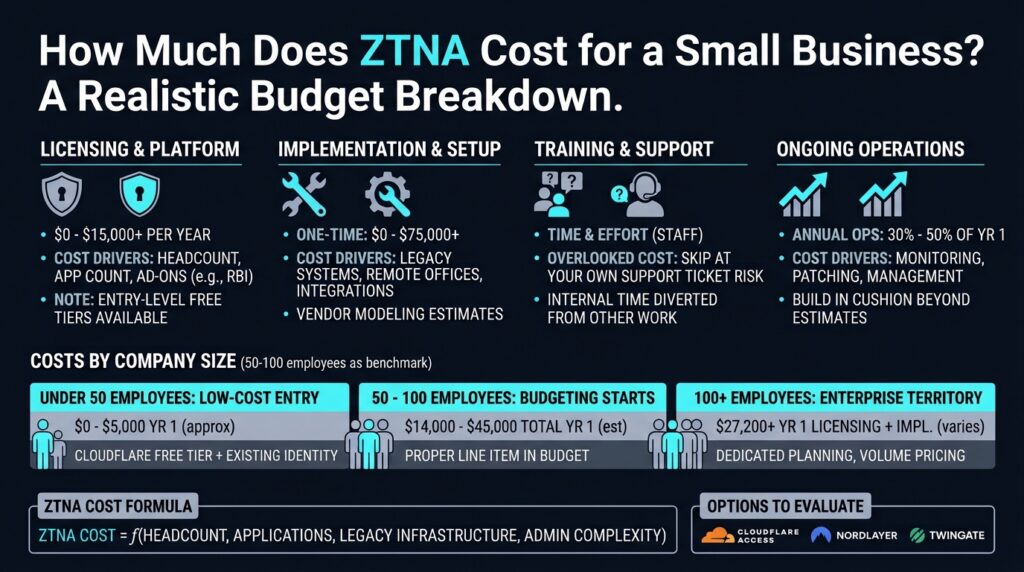
If your business has fewer than 50 people, you have more room to start cheap than most vendor sales pitches let on. According to CloudBrink’s cost breakdown, a company this size can realistically start with Cloudflare Zero Trust’s free tier paired with identity you likely already pay for through Microsoft 365 or Google Workspace, landing year-one cost somewhere in the $0 to $5,000 range.
That free tier isn’t a stripped-down trial. It’s a usable product for smaller teams, with limits on user counts and advanced policy features that will eventually push you toward a paid plan. When you do cross into paid territory, Cloudflare Access publishes a rate of $7 per user per month, per pricing data compiled by ZeroTrustCost.com and confirmed by Spendhound, with a separate $10-per-user add-on if you want Remote Browser Isolation layered on top. (Disclosure: if you sign up through some of the links in this article, EdgeTrustNetwork may earn a commission at no extra cost to you.)
The upgrade point, per CloudBrink’s research, comes when you scale past 50 users or need capabilities the free tier doesn’t offer, like more granular device posture checks or deeper logging. Until then, this tier is less about compromise and more about matching the tool to the actual size of the problem.
50 to 100 Employees: Where Real Budgeting Starts
Once a company crosses into the 50-to-100-employee range, the free-tier math stops working and a proper line item enters the budget. CloudBrink’s May 2026 analysis puts licensing costs here between $4,200 and $15,000 per year, with implementation running an additional $10,000 to $30,000 as a one-time cost. That’s a single vendor’s modeling, so treat it as a starting estimate rather than a locked figure. On a per-user basis, that licensing range works out to roughly $42 to $300 per employee annually depending on where in the bracket you land, which overlaps with the $60 to $240 per-user-per-year range that ZeroTrustCost.com published in June 2026 as a vendor-neutral benchmark. The overlap isn’t proof, but it’s enough to suggest CloudBrink’s numbers aren’t wildly out of line with what the broader market charges.
Add licensing and implementation together and a business in this bracket should plan for a total first-year budget somewhere between $14,000 and $45,000. A company with straightforward cloud apps and a single office lands toward the bottom. One juggling legacy systems, remote offices, or contractor access lands toward the top.
This is also the range where it makes sense to compare named platforms directly rather than defaulting to whatever a sales rep pitches first. NordLayer‘s published pricing varies by source, with iFeeltech and SaaSpare both citing rates between roughly $6 and $14 per user per month depending on tier and contract length. That’s enough of a spread that getting a direct quote before budgeting off any single number matters more than trusting a published price sheet.
Twingate takes a different approach entirely. According to pricing tracked by SaaSworthy and Vendr, Twingate offers a free tier for up to five users, a Teams tier around $5 per user per month, and a Business tier around $10 per user per month. For a company right at the edge of the 50-employee threshold, that structure can push the actual cost meaningfully lower than the CloudBrink licensing range suggests, which is exactly why getting quotes from more than one vendor matters at this size.
100+ Employees: Enterprise Territory, Enterprise Costs
Past the 100-employee mark, ZTNA stops being a side project for whoever handles IT and starts requiring dedicated planning. CloudBrink’s breakdown lists licensing at $7,200 or more annually, with implementation costs ranging from $20,000 up to $75,000 or beyond depending on how many applications, offices, and legacy systems are in play. This too comes from one modeling source. A company at this scale should treat it as a planning anchor and confirm it against direct vendor quotes rather than a fixed number, especially since per-user licensing at larger headcounts can fall below the $60 floor ZeroTrustCost.com found typical elsewhere, simply because volume pricing kicks in.
The part that catches people off guard isn’t year one. It’s what comes after. CloudBrink’s research pegs ongoing annual operations, once you’re past the initial rollout, at 35 to 40 percent of your year-one total. ZeroTrustCost.com’s separate vendor-neutral guidance puts the more general range at 30 to 50 percent, which brackets CloudBrink’s figure without confirming the exact percentage. A company that spent $60,000 getting set up should plan for somewhere in the $18,000 to $30,000 range annually just to keep things running, patched, and monitored, and build in some cushion above that rather than treating either estimate as a ceiling.
The Costs Nobody Puts in the Quote
Every vendor quote you get will show licensing and implementation. Fewer will walk you through the costs that show up after the contract is signed.
Staff time is the big one. Someone has to configure policies, test them against real workflows, and field the inevitable “I can’t access the file server anymore” tickets during the first few weeks. If that person is salaried IT staff already on payroll, it’s not a new cash outlay, but it is real time diverted from other work, and it should factor into whether a rollout timeline is realistic.
Training is the second overlooked line, and a shorter one than most owners assume. Employees used to logging into a VPN or just opening a shared drive need a quick walkthrough on the new login flow. Skipping it tends to generate more support tickets than the training would have cost in the first place.
Finally, there’s the gap between list pricing and what you’ll actually pay. Vendor list prices are starting points, not final numbers, particularly once you’re negotiating for more than a handful of seats. A company sizing its budget purely off a published price sheet risks either overshooting its actual costs or getting caught flat-footed when the real invoice includes add-ons the sales call didn’t mention.
Weighing the Cost Against the Alternative
None of these numbers mean much in isolation. The real question for a business owner isn’t “is $30,000 a lot of money.” It’s “what am I comparing that $30,000 against.”
IBM’s 2025 Cost of a Data Breach Report found that organizations with a mature zero trust deployment saved an average of $1.76 million per breach compared to those without one. That figure is a cost-savings metric tied to breach outcomes, not a benchmark for what implementing zero trust costs, and IBM’s report doesn’t publish a vendor-agnostic implementation cost figure to compare directly against the ranges above. The two numbers answer different questions. But the savings figure still tells you something: a documented access framework changes how a breach unfolds if one happens, often narrowing what an attacker can reach once they’re past the front door. That narrower blast radius is the thing you’re actually paying for when you budget for ZTNA in the first place.
Building Your Own Number
Start by counting what you’re actually protecting: how many employees need access, how many applications matter, whether remote work or contractor access adds complexity. That headcount and app count will point you toward one of the three tiers above faster than any vendor’s marketing page will.
From there, get quotes from at least two or three providers rather than one. List-price gaps between vendors can run wide even for comparable feature sets, as the spread in NordLayer’s own published rates shows. Build in a line for staff time and training even if no vendor asks you to, because that’s the cost most likely to blow past whatever number you first wrote down.
Options to evaluate
If you’re ready to start pulling quotes, three platforms come up repeatedly in small-business budget conversations for different reasons: Cloudflare Access for its usable free tier and straightforward per-user pricing above it, NordLayer for teams wanting a more configurable platform once they outgrow entry-level tools, and Twingate for its lower-cost tiers at smaller user counts. None of these will match a quote generated for your specific setup, but they’re a reasonable starting point for comparison shopping.
That accounting firm owner who hung up the phone at $28,000? A closer look at their situation, a 40-person shop running one cloud accounting platform with no legacy servers, puts them squarely in the free-to-$5,000 tier, assuming they pair Cloudflare’s free plan with the Microsoft 365 identity they already pay for. The $28,000 quote wasn’t wrong for every business their size. It was wrong for this one, because the vendor priced for complexity that didn’t exist.
That’s the pattern underneath all these numbers. ZTNA cost isn’t a fixed feature of company size. It’s a function of what you’re actually protecting, how many apps, how much legacy infrastructure, how many hands touch the system. Get that count right before the sales call, and the budget conversation gets a lot shorter than any vendor makes it seem.